Comparison
5 best Wear OS workout trackers for the gym
By Gymus · Published
The best Wear OS workout trackers for lifting are Gymus, Hevy, Fitbod and JEFIT, plus the strength workouts built into Samsung Health and Google Health. Gymus runs the whole workout from the watch. Hevy is the pick if your friends or an iPhone are involved. The built-in apps are enough if you only want sets on record without installing anything.
We make Gymus, so it is first on this list. To keep the list useful, every entry says where that app is ahead of Gymus, and the only numbers on this page come from our own test. Hevy was tested on a Galaxy Watch in October 2026. The other apps were checked against their store listings, help pages and announcements on 12 November 2026.
| App | Best for | Watches |
|---|---|---|
| Gymus | The whole workout on the watch | Wear OS 3 and newer |
| Hevy | Friends, or an iPhone in the mix | Wear OS watches |
| Fitbod | Workouts written for you | Wear OS watches |
| JEFIT | Ready-made programs | Wear OS watches |
| Samsung Health, Google Health | Not installing anything | Galaxy Watch, Pixel Watch 3 and newer |
What makes a good Wear OS gym tracker?
Building and testing a Wear OS gym app taught us that a few details decide whether people keep logging on the watch or go back to the phone:
- You can log the weight, not just reps. A rep counter cannot tell 60 kg (132 lb) from 80 kg (176 lb), so your progress is only on record if you enter the load.
- The phone can stay in the locker. The app should keep the workout on the watch and sync it later.
- The rest timer keeps running when you leave its screen to check a message or the next exercise.
- The screen goes black between sets. With always-on display on, Hevy keeps its interface lit and used 31% of the battery in a 30-minute workout. Gymus dims to black and used 12% (see the battery test below).
- Plans and history are on the watch. Seeing what you lifted last time is how you decide what to lift today.
Strong is missing because it has no Wear OS app. Its watch app runs on Apple Watch only, as we cover in Gymus vs Strong on Android.
1. Gymus: best for the whole workout on the watch
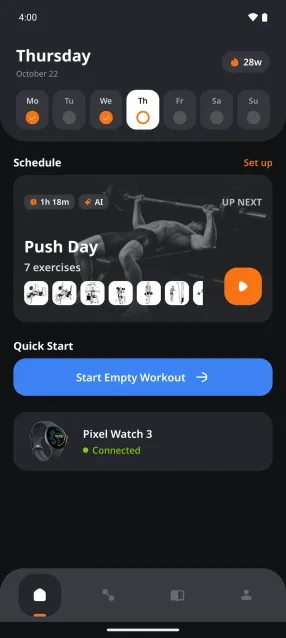
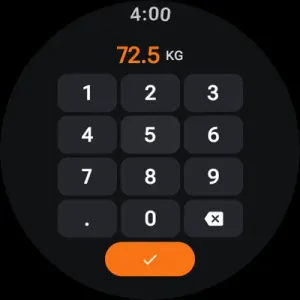
Gymus is a gym log for Android with a native Wear OS app that does not need the phone during the workout. You pick a plan on the watch, log weight and reps on a keypad built for a round screen, and the rest timer starts by itself after each set. Everything syncs back to the phone when you are done.
On the watch you can:
- create and edit workout plans, and read your full workout history
- type 72.5 kg or 160 lb on a keypad instead of scrolling to it, or set your own step for the weight picker
- mark sets as warm-up, drop set or failure, and read your notes for each exercise
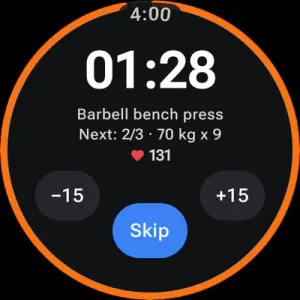
- run a rest timer you set per exercise, with ±15 s buttons and live heart rate
- leave the timer screen and come back to it with the timer still running
- train offline with the phone left in the locker
Where others are ahead: Gymus shows heart rate but not calories on the watch, and it does not count reps for you. It runs on Android phones and Wear OS watches only. It is also newer, so it has a smaller community than Hevy or JEFIT.
See the Gymus watch app, or get Gymus on Google Play.
2. Hevy: best if friends or an iPhone are involved
Hevy is a workout log for iPhone, Android, Apple Watch and Wear OS. Its watch app runs the routines you build on the phone or on the web. You log each set from the wrist, mark warm-up, drop and failure sets, and see heart rate and calories while you train. If the phone is out of range, the watch keeps the workout and saves it once it reconnects.
In our October 2026 test, the watch app could not create or edit routines, show your workout history, or change the rest timer length. Weight and reps are picked from a scrolling list rather than typed. Backing out of the rest timer stopped it, and with always-on display enabled the screen stayed lit between sets.
Where Hevy is ahead: calories on the watch, a social feed with a large community, and apps for iPhone and Apple Watch, so a training partner on iOS can use the same app. The full test is in Gymus vs Hevy on Wear OS.
3. Fitbod: best for workouts written for you
Fitbod’s phone app writes each workout for you. It picks exercises, sets and weights from your history, your equipment and how recovered each muscle group is. Its Wear OS app, last updated in October 2026, adds a tile that opens your workout on the watch, where you follow it and log sets and reps.
Where Fitbod is ahead: you never plan a session yourself. Gymus can draft a plan from your goals with AI, but Fitbod rewrites every workout from your recent training.
Where it falls short on the watch: the watch follows the phone. The workout is planned on the phone, and the watch app needs the phone nearby.
4. JEFIT: best for ready-made programs
JEFIT comes with a large exercise library and a long list of programs, from 5×5 and 5/3/1 to bodybuilding splits. Its Wear OS app lets you search for an exercise and start a workout straight from the watch or follow your planned routine, with an automatic rest timer and an interval timer. It switches between kg and lb, and the workout syncs to your account so you can move between watch and phone mid-session (JEFIT watch app).
Where JEFIT is ahead: the programs. If you want to follow a known routine without building it, JEFIT has more of them ready to go than Gymus.
5. Samsung Health or Google Health: best if you’d rather not install anything
Both big Wear OS watch makers now build strength workouts into the watch. They do less than a gym app, but they are already there.
Galaxy Watch: Samsung Health
Samsung Health can count reps and sets by itself for a short list of free-weight exercises, such as arm curls, deadlifts, shoulder presses, lateral raises and bench press. You set a target for sets, reps and rest, and the watch counts each set and runs the rest between them. It does not let you enter the weight, and the weight machine workout records only time, heart rate and calories, not reps.
Pixel Watch: Google Health
Since 10 November 2026, Pixel Watch 3 and newer can follow a strength workout step by step. You build the routine in the Google Health app on your phone, or have Google’s Health Coach write one, then start it and log reps and weights on the watch. The watch and phone stay in sync during the workout. Google is rolling it out gradually, so it may take a few days to appear on your watch (Google’s announcement).
Where they are ahead: nothing to install, and Samsung Health counts reps for you. Choose a gym app instead when you want the weight on record, your own plans on the watch, and your history in one place.
Battery: what a workout costs your watch
Store pages do not say how much battery a workout uses, so we measured it for two of these apps. We ran the same 30-minute workout with Gymus and with Hevy on the same Galaxy Watch, twice per app with always-on display off and twice with it on, and read the watch’s battery history after each run.
| Battery used per 30 minutes | Always-on off | Always-on on |
|---|---|---|
| Gymus | 6% | 12% |
| Hevy | 12.5% | 31% |
The figures are averages of two runs, measured 10 to 13 October 2026. Your watch, brightness and workout will give different numbers. The gap is widest with always-on display on, where Gymus turns the screen black between sets and Hevy keeps its interface lit. Every run and the method are in Gymus vs Hevy on Wear OS.
Which one should you pick?
- You want to leave the phone in the locker and see your plan and history on the watch: Gymus.
- You train with friends on Hevy, or switch between iPhone and Android: Hevy.
- You would rather be told what to do each session: Fitbod.
- You want to follow a known program such as 5×5: JEFIT.
- You only want sets and reps on record: Samsung Health on a Galaxy Watch, or Google Health on a Pixel Watch 3 or newer.
Switching later is easy. Gymus imports the CSV export from Hevy and Strong, so your history comes with you.