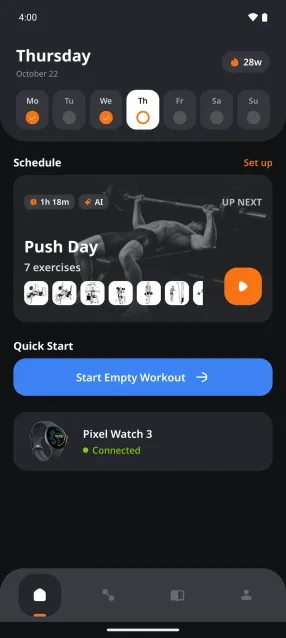
ChatGPT plugin
Gymus in ChatGPT
Install the Gymus plugin in ChatGPT and sign in with the Google account you use in Gymus. Then ask about your training in plain language, or describe a workout and ChatGPT logs it for you.
By Gymus · Published
How to set it up
Get Gymus
The plugin works with your Gymus account. Install Gymus on your Android phone and sign in with Google.
Get it on Google PlayOpen Plugins in ChatGPT
In the ChatGPT app, open the menu and tap Plugins. If you don't see it, tap Explore first. On a computer, go to chatgpt.com/plugins.
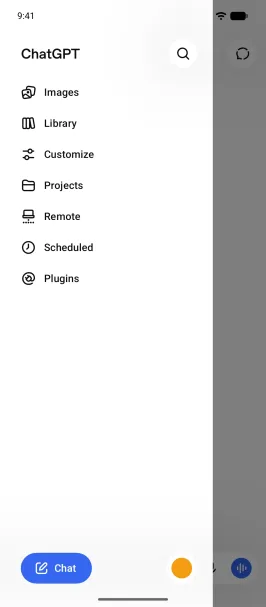
Find Gymus and install it
Tap Search plugins, type Gymus and open it. Then tap Install plugin.
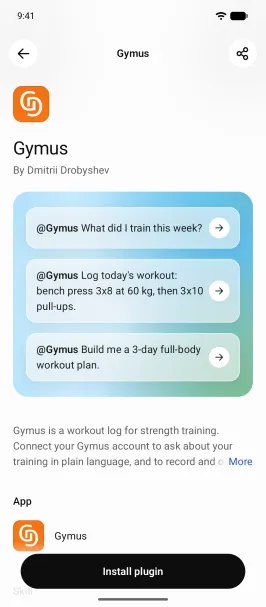
Connect Gymus
ChatGPT explains what it shares with Gymus. Tap Connect Gymus.
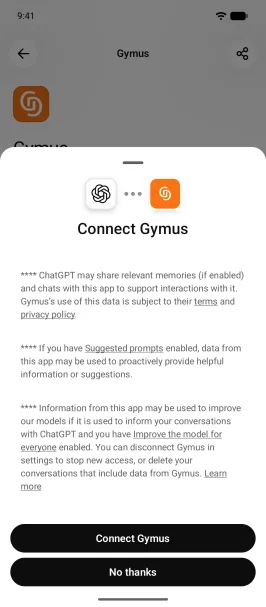
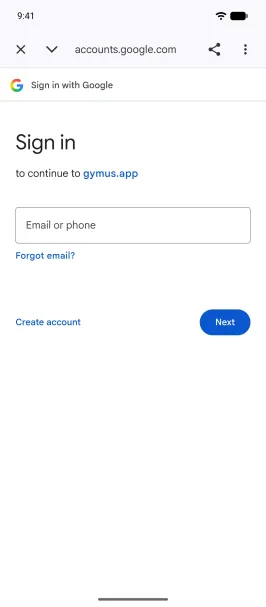
Sign in with Google
Google's sign-in opens. Sign in with the Google account you use in the Gymus app.
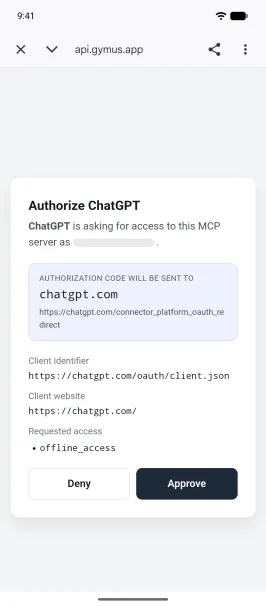
Approve access
Gymus asks you to authorize ChatGPT. Tap Approve to finish connecting.
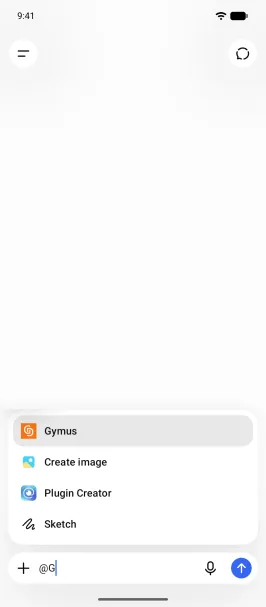
Ask in a new chat
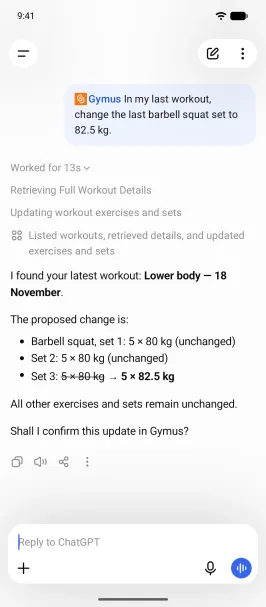
Start a new chat and ask about your training. ChatGPT uses Gymus when your question needs it. To call it directly, type @G and pick Gymus.
What to ask
Ask about your history, or describe training you want logged or planned. A few to start with:
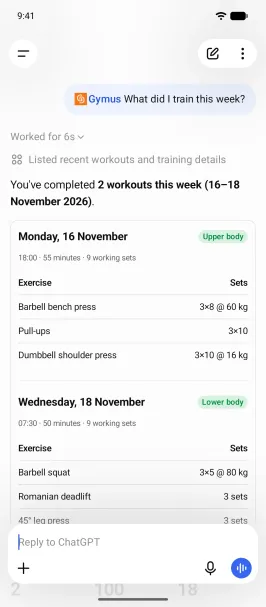
- What did I train this week?
- Summarise my last five workouts.
- Log today's workout: bench press 3x8 at 60 kg, then 3x10 pull-ups.
- Log my weigh-in of 180 lb from this morning.
- Build me a 3-day full-body workout plan.
- Add a note to leg press: seat on hole 5.
Good to know
- Edits and deletes ask first. ChatGPT shows you what will change, and nothing changes until you confirm in the chat. Before a delete, ChatGPT also asks whether to allow Gymus.
- Changes reach the Gymus app the next time it syncs.
- Your schedule and training profile can be read in ChatGPT but changed only in the app. Weigh-ins can be logged in ChatGPT, but corrected or deleted only in the app.
- Exercise names come from the Gymus exercise catalog, in English.
- ChatGPT sees only the Gymus account you signed in with. The Gymus MCP docs list what it can read and change, and the privacy policy covers how Gymus shares it.
Still stuck? Contact support and tell us what you see.
FAQ
ChatGPT plugin, answered
What can ChatGPT see in my Gymus account?
Your workouts (including average and maximum heart rate), workout plans, schedule, training profile, body-weight records and exercise notes. It logs, changes or deletes something only when you ask it to. What ChatGPT receives is handled by OpenAI under its own privacy policy.
I can't find Plugins in ChatGPT
In the ChatGPT app's menu, Plugins can be folded under Explore: tap Explore to show it. If it's not there either, update the app, since older versions call the section Apps. On a work or school account, your workspace admin decides which plugins you can install.
Gymus doesn't show up when I type @
Close and reopen the ChatGPT app after installing Gymus, then start a new chat.
ChatGPT doesn't see my workouts
Check that you signed in with the same Google account you use in the Gymus app. Another Google account opens a new, empty Gymus account. To switch, disconnect Gymus as described below and connect it again. A workout you just logged in the app shows up once the app has synced.
How do I disconnect Gymus?
In ChatGPT, open Plugins, tap Gymus, then the settings button at the top. In the ⋮ menu, choose Disconnect account, or Uninstall to remove the plugin as well. Your workouts stay in Gymus.
Does it work on a computer?
Yes. Plugins work in ChatGPT on the web, in the desktop app and in the mobile apps, so you can set Gymus up on one and use it on the others.
Keep reading
More articles
Comparison ·
5 best Wear OS workout trackers for the gym (2026)
The best Wear OS workout trackers for lifting, compared by what each one does on the watch itself, with a measured battery test. Checked November 2026.
Read the comparisonComparison ·
Gymus vs Strong on Android & Wear OS: gym tracker comparison
Gymus vs Strong on Android: Wear OS watch app, AI plans and workout feedback, supersets, calculators, measurements, import and export. Checked October 2026.
Read the comparisonComparison ·
Gymus vs Hevy on Wear OS: watch app comparison
Gymus vs Hevy on a Wear OS watch: plans, history, rest timer, keypad, always-on display and measured battery drain per workout. Checked October 2026.
Read the comparison


Train smarter. Log faster.
Install Gymus, pick a plan and log your first set today.
Free on Google Play. Android and Wear OS.